Rendering examples
Crazyflow has two renderers. MuJoCo renders the simulated geometry, and gaussian splats render photorealistic images of a captured scene.
MuJoCo rendering
Rendering RGB-D images, changing materials at runtime, raycasting depth, drawing trajectories, and configuring the viewer camera. See MuJoCo Rendering for the rendering modes and cameras.
Cameras and RGBD

Render RGB-D images offscreen from the drone's FPV camera.
Offscreen rendering returns RGB-D images on every frame. The FPV camera (fpv_cam) is attached to
the drone and moves with it. Other cameras are selected by name or id in sim.render.
Run with --plot to animate the images or --save to save them as cameras.gif, which requires
matplotlib from the tests environment.
examples/rendering/cameras.py
"""Render RGB-D images offscreen from the drone's FPV camera.

Offscreen rendering returns RGB-D images on every frame. The FPV camera (`fpv_cam`) is attached to
the drone and moves with it. Other cameras are selected by name or id in `sim.render`.

Run with `--plot` to animate the images or `--save` to save them as cameras.gif, which requires
matplotlib from the `tests` environment.
"""

import argparse
import os
import time

os.environ["SCIPY_ARRAY_API"] = "1"

import mujoco
import numpy as np
from scipy.spatial.transform import Rotation as R

from crazyflow.control import Control
from crazyflow.dynamics import Dynamics
from crazyflow.sim import Sim
from crazyflow.sim.integration import Integrator


def trajectory(t: float, t_tot: float) -> np.ndarray:
    phi = 2 * np.pi * t / t_tot + np.pi
    circle = np.array([np.cos(phi), np.sin(phi)])
    yaw = 2 * np.pi * t / t_tot
    cmd = np.zeros((1, 1, 16))
    cmd[..., :2] = circle  # xy
    cmd[..., 2] = 0.1 + 0.5 * t / t_tot  # z
    cmd[..., 9:13] = R.from_euler("z", yaw).as_quat()

    return cmd


def add_smiley(sim: Sim):
    # Add 3d object to sim
    # create box spec from an XML string
    box_xml = """
    <mujoco model="box_model">
      <worldbody>
        <body name="cube" pos="0 0 0">
          <geom type="box" size="0.05 0.05 0.05" rgba="0.8 0.4 0.2 1"/>
        </body>
      </worldbody>
    </mujoco>
    """
    box_spec = mujoco.MjSpec.from_string(box_xml)
    frame = sim.spec.worldbody.add_frame()
    boxes = [
        # eyes
        ((0.0, -0.15, 0.6), (1, 0, 0, 0)),
        ((0.0, 0.15, 0.6), (1, 0, 0, 0)),
        # mouth
        ((0.0, -0.2, 0.4), (1, 0, 0, 0)),
        ((0.0, 0.2, 0.4), (1, 0, 0, 0)),
        ((0.0, -0.1, 0.3), (1, 0, 0, 0)),
        ((0.0, 0.0, 0.3), (1, 0, 0, 0)),
        ((0.0, 0.1, 0.3), (1, 0, 0, 0)),
    ]
    for i, x in enumerate(boxes):
        box_body = box_spec.body("cube")
        box = frame.attach_body(box_body, "", f":{i}")
        box.pos = x[0]
        box.quat = x[1]
    sim.build_mjx()
    sim.build_reset_fn()


def main(plot: bool = False, save: bool = False):
    """Render RGB-D images from the fpv camera and optionally animate or save them."""
    # Setup sim
    sim = Sim(
        n_drones=1,
        control=Control.state,
        integrator=Integrator.rk4,
        dynamics=Dynamics.first_principles,
        drone="cf2x_T350",
    )
    add_smiley(sim)
    sim.reset()
    pos = sim.data.states.pos.at[...].set([-1, 0, 0])
    states = sim.data.states.replace(pos=pos)
    sim.data = sim.data.replace(states=states)
    duration = 5
    fps = 50
    resolution = (160, 120)
    timings, frames = [], []

    for _ in range(int(duration * fps)):
        t = sim.data.core.steps[0, 0] / sim.freq
        sim.state_control(trajectory(t, duration))
        sim.step(sim.freq // fps)

        t1 = time.perf_counter()
        # mode: Either "human" for the regular window, "rgb_array" for an RGB array,
        #       "depth_array" for a depth array, or "rgbd_tuple" for both at the same time.
        # camera: The name or id of the camera. The names are specified in the corresponding
        #         xml file in crazyflow/drones. For example, "fpv_cam:0" is the first-person view
        #         camera of the first drone, "track_cam:0" is the tracking camera of the first
        #         drone. Id -1 is the global camera.
        rgbd = sim.render(
            width=resolution[0], height=resolution[1], mode="rgbd_tuple", camera="fpv_cam:0"
        )
        t2 = time.perf_counter()
        timings.append(t2 - t1)
        if rgbd is not None:
            frames.append(rgbd)

    sim.close()

    t_mean = np.mean(timings)
    print(f"Average render time {t_mean * 1000:.2f}ms, eqivalent to {1 / t_mean:.2f}fps")
    print("For more optimized depth rendering, check out the raycasting.py example.")
    if plot or save:
        plot_results(frames, fps, show=plot, save=save)


def plot_results(frames: list[tuple[np.ndarray, np.ndarray]], fps: int, show: bool, save: bool):
    """Animate the RGB and depth frames and optionally save them as cameras.gif."""
    import matplotlib.pyplot as plt
    from matplotlib import animation

    fig, (ax1, ax2) = plt.subplots(1, 2, figsize=(10, 5))
    im1 = ax1.imshow(frames[0][0])
    ax1.set_title("RGB")
    ax1.axis("off")
    im2 = ax2.imshow(frames[0][1], cmap="viridis")
    ax2.set_title("Depth")
    ax2.axis("off")
    fig.tight_layout()

    def update_frame(i: int):  # noqa: ANN202
        rgb, depth = frames[i]
        im1.set_data(rgb)
        im2.set_data(depth)
        im2.set_clim(np.nanmin(depth), np.nanmax(depth))
        return im1, im2

    anim = animation.FuncAnimation(
        fig, update_frame, frames=len(frames), interval=1000 / fps, blit=True, repeat=False
    )
    if save:
        anim.save("cameras.gif", writer="pillow", fps=fps)
    if show:
        plt.show()


if __name__ == "__main__":
    parser = argparse.ArgumentParser()
    parser.add_argument("--plot", action="store_true", help="Animate the images")
    parser.add_argument("--save", action="store_true", help="Save the images as cameras.gif")
    args = parser.parse_args()
    main(plot=args.plot, save=args.save)
LED deck and materials
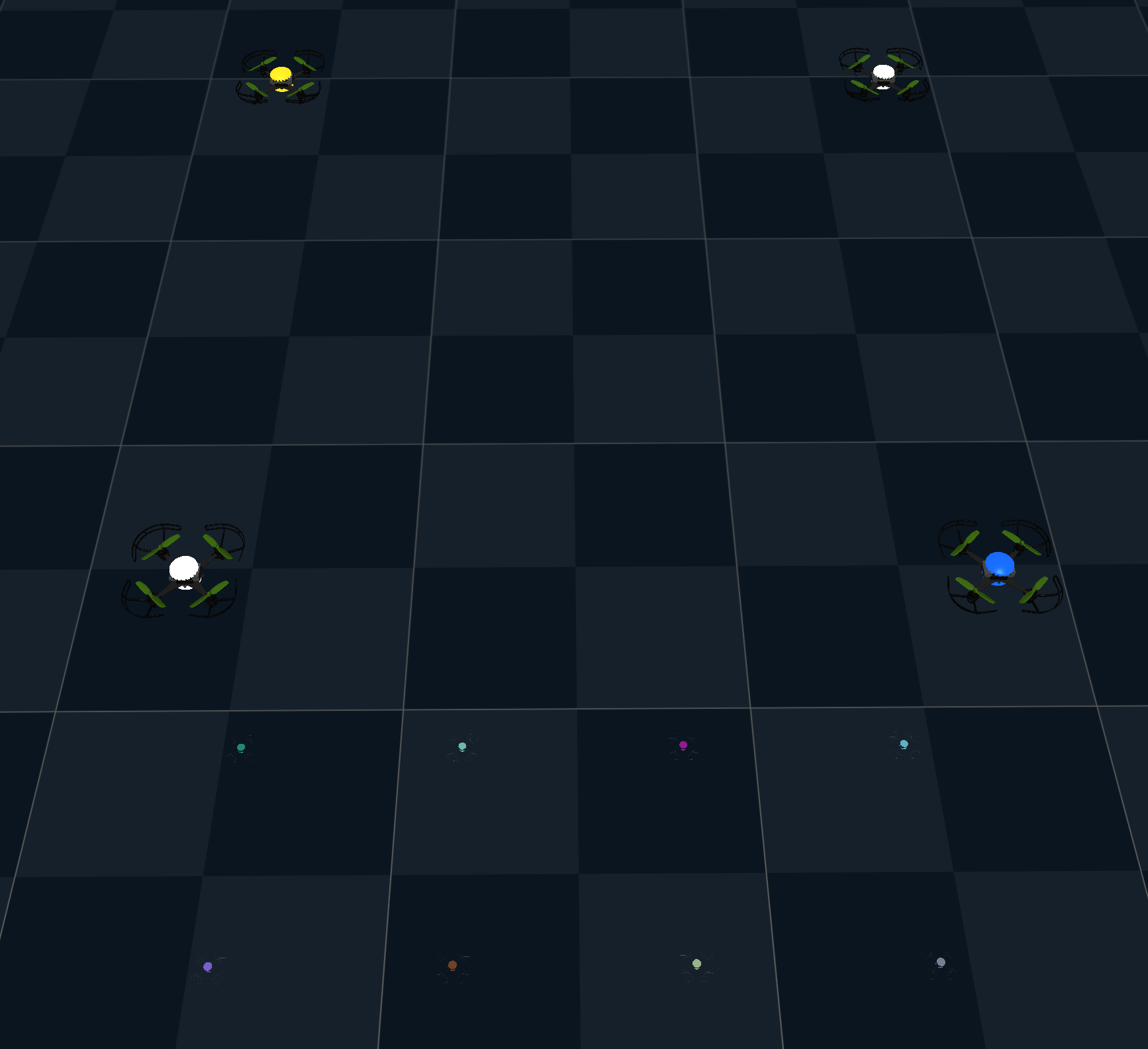
Control the LED decks of a drone swarm through their materials.
change_material updates the RGBA colour and emission of any named material on any subset of
drones at runtime.
examples/rendering/led_deck.py
"""Control the LED decks of a drone swarm through their materials.

`change_material` updates the RGBA colour and emission of any named material on any subset of
drones at runtime.
"""

import os
import tempfile
from pathlib import Path

os.environ["SCIPY_ARRAY_API"] = "1"

import numpy as np
from scipy.spatial.transform import Rotation as R

from crazyflow.control import Control
from crazyflow.sim import Sim
from crazyflow.sim.visualize import change_material

scene_dark_xml = """
<mujoco model="Drone scene">
    <option integrator="RK4" density="1.225" viscosity="1.8e-5" timestep="0.001"/>
    <compiler inertiafromgeom="false" meshdir="assets" autolimits="true"/>
    <statistic center="0 0 2" extent="2.5"/>

    <visual>
        <rgba haze="0.15 0.25 0.35 0" fog="1 1 1 0"/>
        <map fogstart="0" fogend="0"/>
        <global azimuth="-20" elevation="-20" ellipsoidinertia="true"/>
    </visual>

    <asset>
        <texture type="skybox" builtin="gradient" rgb1="0.3 0.5 0.7" rgb2="0 0 0" width="512" height="3072"/>
        <texture type="2d" name="groundplane" builtin="checker" mark="edge" rgb1="0.2 0.3 0.4" rgb2="0.1 0.2 0.3"
        markrgb="0.8 0.8 0.8" width="512" height="512"/>
        <material name="groundplane" texture="groundplane" texuniform="true" texrepeat="2 2" reflectance="0.2"/>
    </asset>

    <worldbody>
        <geom name="floor" size="0 0 0.05" type="plane" material="groundplane"/>
    </worldbody>
</mujoco>
"""  # noqa: E501


def main():
    """Spawn 25 drones in one world and activate led decks."""
    try:
        # Use a named temporary xml file
        with tempfile.NamedTemporaryFile(suffix=".xml", delete=False) as tmp:
            tmp.write(scene_dark_xml.encode())
            tmp.flush()
            tmp_path = Path(tmp.name)

        sim = Sim(n_drones=25, drone="cf21B_500", control=Control.state, xml_path=tmp_path)
        fps = 60
        cmd = np.zeros((sim.n_worlds, sim.n_drones, 4))
        cmd[..., 3] = sim.data.params.mass[0] * 9.81
        rgbas = np.random.default_rng(0).uniform(0, 1, (sim.n_drones, 4))
        rgbas[..., 3] = 1.0

        init_pos = np.array(sim.data.states.pos[0, :, :])
        cmd = np.zeros((sim.n_worlds, sim.n_drones, 16))
        cmd[:, :, 9:13] = R.from_euler("z", 0.0).as_quat()
        cmd[:, :, :3] = init_pos
        cmd[:, :, 2] += 1.5

        for i in range(int(10 * sim.control_freq)):
            sim.state_control(cmd)
            sim.step(sim.freq // sim.control_freq)
            if ((i * fps) % sim.control_freq) < fps:
                even_ids = np.arange(0, sim.n_drones, 2)
                odd_ids = np.arange(1, sim.n_drones, 2)
                emission = np.sin(i / sim.control_freq * np.pi)
                change_material(
                    sim,
                    mat_name="led_top",
                    drone_ids=even_ids,
                    rgba=rgbas[even_ids, :],
                    emission=emission,
                )
                change_material(
                    sim,
                    mat_name="led_bot",
                    drone_ids=odd_ids,
                    rgba=rgbas[odd_ids, :],
                    emission=emission,
                )
                sim.render()
        sim.close()
    finally:
        # clean up the temporary file
        if tmp_path is not None and tmp_path.exists():
            try:
                tmp_path.unlink()
            except Exception:
                pass


if __name__ == "__main__":
    main()
Raycasting and depth sensing
Render depth images by raycasting the scene geometry.
render_depth returns per-pixel distances for rays emitted from the camera. This is faster than
full RGB rendering and useful for obstacle sensing or depth-based controllers.
build_render_depth_fn compiles a renderer for repeated calls.
Run with --plot to plot the results, which requires matplotlib from the tests environment.
examples/rendering/raycasting.py
"""Render depth images by raycasting the scene geometry.

`render_depth` returns per-pixel distances for rays emitted from the camera. This is faster than
full RGB rendering and useful for obstacle sensing or depth-based controllers.
`build_render_depth_fn` compiles a renderer for repeated calls.

Run with `--plot` to plot the results, which requires matplotlib from the `tests` environment.
"""

import argparse

import jax.numpy as jnp

from crazyflow.sim import Sim
from crazyflow.sim.sensors.depth import build_render_depth_fn, render_depth


def main(plot: bool = False):
    sim = Sim()
    sim.data = sim.data.replace(
        states=sim.data.states.replace(pos=sim.data.states.pos.at[..., 2].set(0.2))
    )
    # The easiest way to get depth images is to use the render_depth function
    dist = render_depth(sim, camera=0, resolution=(100, 100), include_drone=False)
    dist = dist.at[dist > 1.5].set(jnp.nan)  # Cap max distance for better visualization
    if plot:
        plot_depth(dist[0], "Raycast Distance from Camera")
    # We can also build a depth renderer function for better performance if we need maximum speed or
    # more fine-grained control. Here we only render the drone collision geometry to avoid expensive
    # raycasting against the high-poly visual mesh of the drone.
    render_depth_fn = build_render_depth_fn(
        sim.mjx_model, camera=0, resolution=(200, 200), geomgroup=(1, 1, 0, 1, 1, 1, 1, 1)
    )
    dist_fn = render_depth_fn(sim)
    dist_fn = dist_fn.at[dist_fn > 1.5].set(jnp.nan)  # Cap max distance for better visualization
    if plot:
        plot_depth(dist_fn[0], "Raycast Distance from Camera (Compiled)")


def plot_depth(dist: jnp.ndarray, title: str):
    import matplotlib.pyplot as plt

    plt.imshow(dist, cmap="viridis")
    plt.colorbar(label="Distance (m)")
    plt.title(title)
    plt.show()


if __name__ == "__main__":
    parser = argparse.ArgumentParser()
    parser.add_argument("--plot", action="store_true", help="Plot the results")
    main(plot=parser.parse_args().plot)
Drawing trajectories
Draw a colored trace behind each of 25 drones in the MuJoCo viewer.
examples/rendering/draw_line.py
"""Draw a colored trace behind each of 25 drones in the MuJoCo viewer."""

from collections import deque

import numpy as np

from crazyflow.sim import Dynamics, Sim
from crazyflow.sim.visualize import draw_line


def main():
    """Spawn 25 drones in one world and render each with a trace behind it."""
    n_worlds, n_drones = 1, 25
    sim = Sim(n_worlds=n_worlds, n_drones=n_drones, dynamics=Dynamics.so_rpy, device="cpu")
    fps = 60
    cmd = np.zeros((sim.n_worlds, sim.n_drones, 4))
    cmd[..., 3] = sim.data.params.mass[0] * 9.81 * 1.05
    rgbas = np.random.default_rng(0).uniform(0, 1, (n_drones, 4))
    rgbas[..., 3] = 1.0

    pos = deque(maxlen=16)

    for i in range(int(5 * sim.control_freq)):
        sim.attitude_control(cmd)
        sim.step(sim.freq // sim.control_freq)
        if i % 20 == 0:
            pos.append(sim.data.states.pos[0, :])
        if ((i * fps) % sim.control_freq) < fps:
            lines = np.array(pos)
            for i in range(n_drones):
                draw_line(sim, lines[:, i, :], rgbas[i, :], start_size=0.3, end_size=3.0)
            sim.render()
    sim.close()


if __name__ == "__main__":
    main()
Camera configuration
Change the viewer camera with a camera configuration.
The script renders the same flight twice, first with the default camera and then with a camera that looks at the origin from a fixed distance, elevation, and azimuth.
examples/rendering/cam_config.py
"""Change the viewer camera with a camera configuration.

The script renders the same flight twice, first with the default camera and then with a camera
that looks at the origin from a fixed distance, elevation, and azimuth.
"""

import os

os.environ["SCIPY_ARRAY_API"] = "1"

import numpy as np
from scipy.spatial.transform import Rotation as R

from crazyflow.sim import Sim

cam_config = {"distance": 0.8, "elevation": -45.0, "azimuth": -135.0, "lookat": [0.0, 0.0, 0.0]}


def main(cam_config: dict | None = None):
    sim = Sim(control="state")
    sim.reset()

    duration = 5.0
    fps = 60

    cmd = np.zeros((sim.n_worlds, sim.n_drones, 16))
    cmd[..., 9:13] = R.from_euler("z", 0.0).as_quat()
    cmd[..., :3] = 0.2

    for i in range(int(duration * sim.control_freq)):
        sim.state_control(cmd)
        sim.step(sim.freq // sim.control_freq)
        if ((i * fps) % sim.control_freq) < fps:
            sim.render(cam_config=cam_config)
    sim.close()


if __name__ == "__main__":
    main(cam_config=None)
    main(cam_config=cam_config)
Gaussian splat rendering
Viewing the simulation as gaussian splats, rendering RGB-D images from the drone cameras, and differentiating through the renderer. The examples download the demo splats from the amacati/splats dataset on first run. See Gaussian Splat Rendering for the setup.
Splat viewer
Render the simulation as gaussian splats in a web-based viewer.
SplatViewer serves a web viewer at http://localhost:8080. The splats are streamed to the
browser once, after which update only pushes the drone poses, so the viewer runs in real time.
Requires splax (pip install "crazyflow[splats]").
examples/rendering/splat_viewer.py
"""Render the simulation as gaussian splats in a web-based viewer.

`SplatViewer` serves a web viewer at `http://localhost:8080`. The splats are streamed to the
browser once, after which `update` only pushes the drone poses, so the viewer runs in real time.
Requires splax (`pip install "crazyflow[splats]"`).
"""

from __future__ import annotations

import logging
import os
import time

os.environ["SCIPY_ARRAY_API"] = "1"

import numpy as np
from scipy.spatial.transform import Rotation as R
from splax.io import fetch

from crazyflow.sim import Sim
from crazyflow.sim.splat import SplatViewer, attach_splats

logger = logging.getLogger(__name__)
ASSETS_URL = "https://huggingface.co/datasets/amacati/splats/resolve/main"


def trajectory(t: float) -> np.ndarray:
    cmd = np.zeros((1, 1, 16))
    cmd[..., 9:13] = R.from_euler("z", 0.0).as_quat()
    cmd[..., :3] = [0.5 * (np.cos(t) - 1), 0.5 * np.sin(t), 1.0 + 0.2 * np.sin(0.5 * t)]
    return cmd


def main():
    sim = Sim(control="state")
    scene = fetch(f"{ASSETS_URL}/robot_hall.ply")
    drone = fetch(f"{ASSETS_URL}/{sim.drone}.ply")
    attach_splats(sim, scene=scene, drone=drone)
    viewer = SplatViewer(sim)

    for i in range(500):
        t_start = time.perf_counter()
        sim.state_control(trajectory(i / sim.control_freq))
        sim.step(sim.freq // sim.control_freq)
        viewer.update(sim)
        time.sleep(max(0.0, 1 / sim.control_freq - (time.perf_counter() - t_start)))

    viewer.close()
    sim.close()


if __name__ == "__main__":
    logging.basicConfig(level=logging.INFO)
    logging.getLogger("jax").setLevel(logging.WARNING)
    main()
Splat camera
Render the FPV cameras of two drones looking at each other with gaussian splats.
render_splat_rgb renders the FPV camera of every drone in every world in a single batched call.
Requires splax (pip install "crazyflow[splats]") and a CUDA GPU.
Run with --plot to plot the results, which requires matplotlib from the tests environment.
examples/rendering/splat_camera.py
"""Render the FPV cameras of two drones looking at each other with gaussian splats.

`render_splat_rgb` renders the FPV camera of every drone in every world in a single batched call.
Requires splax (`pip install "crazyflow[splats]"`) and a CUDA GPU.

Run with `--plot` to plot the results, which requires matplotlib from the `tests` environment.
"""

from __future__ import annotations

import argparse
import logging
import os
from typing import TYPE_CHECKING

os.environ["SCIPY_ARRAY_API"] = "1"
os.environ["XLA_PYTHON_CLIENT_PREALLOCATE"] = "false"

import numpy as np
from scipy.spatial.transform import Rotation as R
from splax.io import fetch

from crazyflow.sim import Sim
from crazyflow.sim.sensors.splat import render_splat_rgb
from crazyflow.sim.splat import attach_splats

if TYPE_CHECKING:
    from collections.abc import Callable

    from numpy.typing import NDArray

ASSETS_URL = "https://huggingface.co/datasets/amacati/splats/resolve/main"

RADIUS = 0.5
HEIGHT = 1.0


def trajectory(t: float, n_worlds: int, n_drones: int) -> np.ndarray:
    """Circle both drones around the center, each yawed to look across at its partner."""
    angle = t + (2 * np.pi / n_drones) * np.arange(n_drones)
    cmd = np.zeros((n_worlds, n_drones, 16))
    cmd[..., 0] = RADIUS * np.cos(angle)
    cmd[..., 1] = RADIUS * np.sin(angle)
    cmd[..., 2] = HEIGHT
    yaw = angle + np.pi  # yaw faces the opposite point on the circle, where the partner is
    cmd[..., 9:13] = R.from_euler("z", yaw[:, None]).as_quat()
    return cmd


def main(plot: bool = False):
    """Render the splat camera views of both drones in both worlds."""
    sim = Sim(n_worlds=2, n_drones=2, control="state", device="gpu")
    scene = fetch(f"{ASSETS_URL}/robot_hall.ply")
    drone = fetch(f"{ASSETS_URL}/{sim.drone}.ply")
    attach_splats(sim, scene=scene, drone=drone)

    angle = (2 * np.pi / sim.n_drones) * np.arange(sim.n_drones)
    x, y, z = RADIUS * np.cos(angle), RADIUS * np.sin(angle), np.full_like(angle, HEIGHT)
    pos = np.stack([x, y, z], axis=-1)
    quat = R.from_euler("z", (angle + np.pi)[:, None]).as_quat()
    states = sim.data.states.replace(pos=sim.data.states.pos.at[...].set(pos))
    states = states.replace(quat=sim.data.states.quat.at[...].set(quat))
    sim.data = sim.data.replace(states=states)

    duration = 6
    fps = 30
    n_frames = int(duration * fps)
    resolution = (320, 240)

    update_plot = plot_views(sim.n_worlds, sim.n_drones, resolution) if plot else None
    for _ in range(n_frames):
        t = sim.data.core.steps[0, 0] / sim.freq
        sim.state_control(trajectory(t, sim.n_worlds, sim.n_drones))
        sim.step(sim.freq // fps)
        # Render each drone's fpv across all worlds, hiding each drone from its own view.
        views = render_splat_rgb(sim, resolution=resolution)
        if plot:
            update_plot(views)
    sim.close()


def plot_views(
    n_worlds: int, n_drones: int, resolution: tuple[int, int]
) -> Callable[[NDArray], None]:
    """Open a window for the camera views and return a function that draws the next ones."""
    import matplotlib.pyplot as plt

    fig, axes = plt.subplots(n_worlds, n_drones, figsize=(10, 7))
    img = np.zeros((resolution[1], resolution[0], 3), dtype=np.float32)
    ims = np.empty((n_worlds, n_drones), dtype=object)
    for w in range(n_worlds):
        for d in range(n_drones):
            ax = axes[w, d]
            ims[w, d] = ax.imshow(img)
            ax.set_title(f"World {w}, drone {d} FPV")
            ax.axis("off")
    fig.tight_layout()
    plt.show(block=False)

    def update(views: NDArray) -> None:
        for w in range(n_worlds):
            for d in range(n_drones):
                ims[w, d].set_data(views[w, d])
        fig.canvas.draw_idle()
        plt.pause(1e-12)

    return update


if __name__ == "__main__":
    logging.basicConfig(level=logging.INFO)
    logging.getLogger("jax").setLevel(logging.WARNING)
    parser = argparse.ArgumentParser()
    parser.add_argument("--plot", action="store_true", help="Plot the results")
    main(plot=parser.parse_args().plot)
Splat depth camera
Fly a lap through a hall and renders gaussian splat depth images.
build_render_splat_rgbd_fn compiles an RGB-D renderer that is a pure function of sim.data.
Requires splax (pip install "crazyflow[splats]") and a CUDA GPU.
Run with --plot to plot the results, which requires matplotlib from the tests environment.
examples/rendering/splat_depth.py
"""Fly a lap through a hall and renders gaussian splat depth images.

`build_render_splat_rgbd_fn` compiles an RGB-D renderer that is a pure function of `sim.data`.
Requires splax (`pip install "crazyflow[splats]"`) and a CUDA GPU.

Run with `--plot` to plot the results, which requires matplotlib from the `tests` environment.
"""

from __future__ import annotations

import argparse
import logging
import os
from typing import TYPE_CHECKING

os.environ["SCIPY_ARRAY_API"] = "1"
os.environ["XLA_PYTHON_CLIENT_PREALLOCATE"] = "false"

import numpy as np
from scipy.spatial.transform import Rotation as R
from splax.io import fetch

from crazyflow.sim import Sim
from crazyflow.sim.sensors.splat import build_render_splat_rgbd_fn
from crazyflow.sim.splat import attach_splats

if TYPE_CHECKING:
    from collections.abc import Callable

    from numpy.typing import NDArray

ASSETS_URL = "https://huggingface.co/datasets/amacati/splats/resolve/main"

TRAJ_CENTER = np.array([0.0, 0.0, 1.5])
TRAJ_SIZE = np.array([9.0, 3.5, 0.0])
MAX_RANGE = 12.0
RESOLUTION = (320, 240)
DURATION = 40
FPS = 30


def trajectory(t: float) -> np.ndarray:
    """Return an elliptical lap with the yaw along the tangent."""
    omega = 2.0 * np.pi / DURATION
    phi = omega * t
    cmd = np.zeros((1, 1, 16))
    cmd[..., 0:3] = TRAJ_CENTER + TRAJ_SIZE * np.array([np.cos(phi), np.sin(phi), 0.0])
    yaw = np.arctan2(TRAJ_SIZE[1] * np.cos(phi), -TRAJ_SIZE[0] * np.sin(phi))
    cmd[..., 9:13] = R.from_euler("z", yaw).as_quat()
    return cmd


def main(plot: bool = False):
    """Fly the lap and render the depth channel of the drone's fpv camera."""
    sim = Sim(control="state", device="gpu")
    scene = fetch(f"{ASSETS_URL}/robot_hall.ply")
    drone = fetch(f"{ASSETS_URL}/{sim.drone}.ply")
    attach_splats(sim, scene=scene, drone=drone)
    render = build_render_splat_rgbd_fn(sim, drones=0, resolution=RESOLUTION, max_range=MAX_RANGE)

    # Start on the lap so the controller does not have to fly in from the origin first
    cmd = trajectory(0.0)
    states = sim.data.states.replace(pos=sim.data.states.pos.at[...].set(cmd[..., :3]))
    states = states.replace(quat=states.quat.at[...].set(cmd[..., 9:13]))
    sim.data = sim.data.replace(states=states)

    update_plot = plot_depth() if plot else None
    for i in range(DURATION * FPS):
        sim.state_control(trajectory(i / FPS))
        sim.step(sim.freq // FPS)
        depth = render(sim.data)[0, 0, ..., 3]
        if plot:
            update_plot(depth)
    sim.close()


def plot_depth() -> Callable[[NDArray], None]:
    """Open a window for the depth images and return a function that draws the next one."""
    import matplotlib.pyplot as plt

    fig, ax = plt.subplots(figsize=(7, 5))
    im = ax.imshow(np.zeros(RESOLUTION[::-1]), cmap="turbo_r", vmin=0.0, vmax=MAX_RANGE)
    ax.set_title("Splat depth camera, fpv")
    ax.axis("off")
    fig.colorbar(im, ax=ax, label="depth along the optical axis (m)")
    fig.tight_layout()
    plt.show(block=False)

    def update(depth: NDArray) -> None:
        im.set_data(depth)
        fig.canvas.draw_idle()
        fig.canvas.flush_events()

    return update


if __name__ == "__main__":
    logging.basicConfig(level=logging.INFO)
    logging.getLogger("jax").setLevel(logging.WARNING)
    parser = argparse.ArgumentParser()
    parser.add_argument("--plot", action="store_true", help="Plot the results")
    main(plot=parser.parse_args().plot)
Differentiable splat rendering
Compare splat-rendered FPV gradients with known z-position and yaw gradients.
Splat rendering is differentiable w.r.t. the camera pose. A reference FPV image is rendered at a
baseline pose, and its photometric error is differentiated over small z and yaw offsets.
Requires splax (pip install "crazyflow[splats]") and a CUDA GPU.
Run with --plot to plot the results, which requires matplotlib from the tests environment.
examples/rendering/splat_gradients.py
"""Compare splat-rendered FPV gradients with known z-position and yaw gradients.

Splat rendering is differentiable w.r.t. the camera pose. A reference FPV image is rendered at a
baseline pose, and its photometric error is differentiated over small z and yaw offsets.
Requires splax (`pip install "crazyflow[splats]"`) and a CUDA GPU.

Run with `--plot` to plot the results, which requires matplotlib from the `tests` environment.
"""

from __future__ import annotations

import argparse
import logging
import os
from functools import partial
from typing import TYPE_CHECKING

os.environ["SCIPY_ARRAY_API"] = "1"
os.environ["XLA_PYTHON_CLIENT_PREALLOCATE"] = "false"

import jax
import jax.numpy as jnp
import mujoco
import numpy as np
import splax
from scipy.spatial.transform import Rotation as R
from splax.io import fetch

from crazyflow.sim import Sim
from crazyflow.sim.sensors.splat import camera_intrinsics
from crazyflow.sim.splat import SPLATS_KEY, attach_splats

if TYPE_CHECKING:
    from collections.abc import Callable

    from jax import Array
    from numpy.typing import NDArray

ASSETS_URL = "https://huggingface.co/datasets/amacati/splats/resolve/main"

BASELINE_POSITION = np.array([5.0, 0.0, 2.0], dtype=np.float32)
BASELINE_QUATERNION = np.array([0.0, 0.0, 0.0, 1.0], dtype=np.float32)  # xyzw

RESOLUTION = (360, 240)
# Limit to 100 to prevent OOM during testing when JAX has already claimed significant GPU memory
N_SAMPLES = 100
MAX_Z_OFFSET = 0.025
MAX_YAW_DEGREES = 0.1


def _camera_viewmats(
    z_offsets: Array, yaw_angles: Array, camera_position: Array, camera_rotation: R
) -> Array:
    """Create splax world-to-camera matrices for z/yaw drone poses."""
    n_views = z_offsets.shape[0]
    position = jnp.broadcast_to(jnp.asarray(BASELINE_POSITION), (n_views, 3))
    position = position.at[:, 2].add(z_offsets)

    body_rotation = R.from_quat(jnp.asarray(BASELINE_QUATERNION)) * R.from_euler(
        "z", yaw_angles[:, None]
    )
    camera_world_position = position + body_rotation.apply(camera_position)

    # MuJoCo cameras use OpenGL axes. Rotate them 180 degrees around x to obtain the OpenCV axes
    # expected by splax, then invert the complete camera-to-world rotation.
    camera_to_world = body_rotation * camera_rotation * R.from_euler("x", jnp.pi)
    world_to_camera_rotation = camera_to_world.inv().as_matrix()
    world_to_camera_translation = -(world_to_camera_rotation @ camera_world_position[..., None])[
        ..., 0
    ]

    viewmats = jnp.broadcast_to(jnp.eye(4, dtype=z_offsets.dtype), (n_views, 4, 4))
    viewmats = viewmats.at[:, :3, :3].set(world_to_camera_rotation)
    return viewmats.at[:, :3, 3].set(world_to_camera_translation)


def _build_renderer(sim: Sim) -> Callable[[Array, Array], Array]:
    """Build a differentiable FPV renderer parameterized by z and yaw."""
    camera_id = mujoco.mj_name2id(sim.mj_model, mujoco.mjtObj.mjOBJ_CAMERA, "fpv_cam:0")
    if camera_id < 0:
        raise ValueError("Camera 'fpv_cam:0' not found in the model")

    camera_position = jnp.asarray(sim.mj_model.cam_pos[camera_id], dtype=jnp.float32)
    camera_quaternion = jnp.roll(
        jnp.asarray(sim.mj_model.cam_quat[camera_id], dtype=jnp.float32), -1
    )  # wxyz -> xyzw
    camera_rotation = R.from_quat(camera_quaternion)

    f, c = camera_intrinsics(sim.mj_model, camera_id, RESOLUTION)
    splats = sim.data.plugins[SPLATS_KEY]
    background = jnp.zeros(3, dtype=splats.means.dtype)
    image_shape = (RESOLUTION[1], RESOLUTION[0])
    render = partial(
        splax.render, *splats.params, background=background, img_shape=image_shape, f=f, c=c
    )

    def render_views(z_offsets: Array, yaw_angles: Array) -> Array:
        viewmats = _camera_viewmats(z_offsets, yaw_angles, camera_position, camera_rotation)
        return jax.vmap(lambda viewmat: render(viewmat=viewmat)[0])(viewmats)

    return render_views


def plot_results(experiments: tuple[tuple[NDArray, NDArray, NDArray, str, str], ...]) -> None:
    """Plot normalized gradient comparisons for both pose sweeps."""
    import matplotlib.pyplot as plt

    fig, axes = plt.subplots(1, 2, figsize=(12, 4), constrained_layout=True)
    for axis, (x_values, image_gradient, pose_gradient, title, x_label) in zip(
        axes, experiments, strict=True
    ):
        image_gradient = image_gradient / np.max(np.abs(image_gradient))
        pose_gradient = pose_gradient / np.max(np.abs(pose_gradient))

        axis.plot(x_values, image_gradient, label="FPV photometric gradient", linewidth=2)
        axis.plot(x_values, pose_gradient, "--", label="Known pose gradient", linewidth=2)
        axis.axvline(0.0, color="black", linewidth=1, alpha=0.4)
        axis.set_title(title)
        axis.set_xlabel(x_label)
        axis.set_ylabel("Normalized gradient")
        axis.set_ylim(-1.1, 1.1)
        axis.grid(alpha=0.25)
        axis.legend()

    fig.suptitle(
        "Differentiable FPV pose gradients\n"
        "Each gradient curve is normalized by its own maximum absolute value"
    )
    plt.show()


def main(plot: bool = False) -> None:
    """Compare photometric and known pose gradients for independent z and yaw sweeps."""
    sim = Sim(n_worlds=1, n_drones=1, device="gpu")
    scene = fetch(f"{ASSETS_URL}/robot_hall.ply")
    attach_splats(sim, scene=scene)
    render = _build_renderer(sim)

    z_offsets = jnp.linspace(-MAX_Z_OFFSET, MAX_Z_OFFSET, N_SAMPLES, dtype=jnp.float32)
    yaw_angles = jnp.deg2rad(
        jnp.linspace(-MAX_YAW_DEGREES, MAX_YAW_DEGREES, N_SAMPLES, dtype=jnp.float32)
    )
    zeros = jnp.zeros_like(z_offsets)
    reference_image = jax.lax.stop_gradient(render(zeros[:1], zeros[:1])[0])

    def photometric_objective(z_offsets: Array, yaw_angles: Array) -> Array:
        images = render(z_offsets, yaw_angles)
        return jnp.mean((images - reference_image) ** 2, axis=(1, 2, 3)).sum()

    pose_gradient = jax.jit(jax.grad(photometric_objective, argnums=(0, 1)))
    z_gradient, _ = pose_gradient(z_offsets, zeros)
    _, yaw_gradient = pose_gradient(zeros, yaw_angles)
    sim.close()

    experiments = (
        (
            100.0 * z_offsets,
            z_gradient,
            z_offsets,
            "Z translation only",
            "z offset from baseline (cm)",
        ),
        (
            np.rad2deg(yaw_angles),
            yaw_gradient,
            yaw_angles,
            "Yaw rotation only",
            "yaw offset from baseline (degrees)",
        ),
    )
    if plot:
        plot_results(experiments)


if __name__ == "__main__":
    logging.basicConfig(level=logging.INFO)
    logging.getLogger("jax").setLevel(logging.WARNING)
    parser = argparse.ArgumentParser()
    parser.add_argument("--plot", action="store_true", help="Plot the results")
    main(plot=parser.parse_args().plot)